

How to Write an Essay Draft in Paperite
Writing an essay can be a demanding academic task, requiring meticulous research, structured outlining, and precise articulation. This guide is designed for college students aiming to streamline their writing process by leveraging Paperite's advanced AI capabilities. In approximately 10 minutes, once your topic and sources are prepared, you will learn how to generate a comprehensive essay draft, moving efficiently from project creation to a structured initial output. Paperite helps you accelerate your research and writing, enabling you to focus more on critical analysis and refinement.
Writing an essay can be a demanding academic task, requiring meticulous research, structured outlining, and precise articulation. This guide is designed for college students aiming to streamline their writing process by leveraging Paperite's advanced AI capabilities. In approximately 10 minutes, once your topic and sources are prepared, you will learn how to generate a comprehensive essay draft, moving efficiently from project creation to a structured initial output. Paperite helps you accelerate your research and writing, enabling you to focus more on critical analysis and refinement.
What You'll Need
To successfully generate an essay draft in Paperite, ensure you have the following prerequisites in place:
A Paperite account and login credentials:
Access to the platform is fundamental. If you're a new user, you'll need to register and create an account. Existing users can simply log in with their credentials.
An active internet connection:
Paperite is a cloud-based platform, and a stable internet connection is essential for accessing its features, performing online searches, and generating your essay draft without interruptions.
Your essay topic or prompt:
A clear and well-defined essay topic or prompt is crucial. The more specific your topic, the more relevant and focused the AI-generated draft will be. Consider your assignment guidelines carefully when formulating your topic.
Any specific sources (articles, books, websites) you wish to include in your essay:
Paperite can integrate your research directly into the draft. These sources should either be already saved in your personal Paperite Library for easy access or readily available online. Having your research materials organized beforehand significantly enhances the quality and accuracy of the generated content.
Step-by-Step Guide
Follow these sequential steps to generate your essay draft efficiently using Paperite.ai.
1. Access Paperite and log in
Navigate to the Paperite website in your preferred web browser. Enter your registered email address and password into the designated fields. Upon successful authentication, the Paperite dashboard will appear, serving as your central hub for all projects and documents.
2. Start a new project or select an existing one
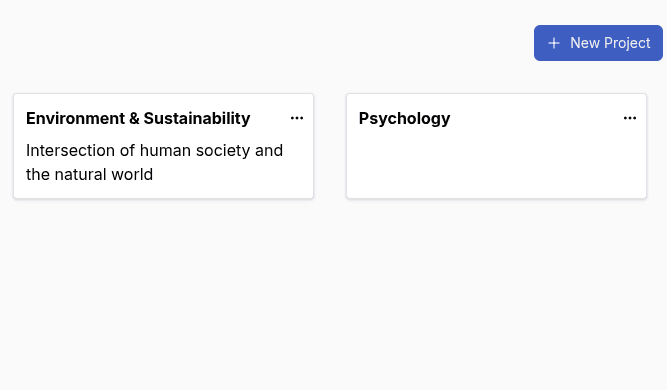
From your dashboard, you have the option to either initiate a completely new project for your current essay or select an existing project if your essay is part of an ongoing body of work. Creating a project helps organize your documents and sources effectively. If starting new, click the "New Project" button.
3. Enter the project name and confirm
If you opted to start a new project, a dialog box will prompt you to enter a project name. Choose a descriptive name that clearly identifies your essay or assignment, such as "Literature Review on AI Ethics" or "Argumentative Essay on Climate Policy." After entering the name, confirm your selection, and the newly created project's overview page will be displayed, ready for content creation.
4. Go to the newly created project and select 'New Document'
Within your active project's overview page, locate and click the "New Document" button or similar prompt. This action will lead you to a document creation form or a selection menu, where you can specify the type of content you intend to generate.
5. Select 'Essay' and 'Full Draft' from the form options
On the document creation screen, identify and select "Essay" as the document type. Following this, choose "Full Draft" from the available options. This configuration instructs Paperite's AI to generate a complete, structured essay rather than just an outline or summary. The essay draft configuration form will then load, presenting various settings for customization.
6. Select your essay sources
Paperite offers several flexible options for integrating your research sources:
Choose 'My Library'
: Select this option to utilize academic articles, research papers, or web pages you have previously uploaded or saved within your Paperite Library. This is ideal for ongoing research where you've already curated relevant materials.
Use 'Online Search'
: This feature allows you to search for and integrate new web-based sources directly from within Paperite. You can specify keywords or topics, and the AI will help you find relevant academic resources or reputable websites to strengthen your essay.
Select 'Select Files'
: Opt for this if you have local documents (such as PDF articles, DOCX research papers, or text files) on your computer that you wish to include. You can upload these files, and Paperite will process their content for inclusion in your draft. Ensure a variety of high-quality, relevant sources for the best output.
7. Choose essay type, word count, and output format
Configure the structural and formatting aspects of your essay:
Select your desired 'Essay Type'
: From the dropdown menu, choose the genre that best fits your assignment, such as Analytical, Argumentative, Expository, or Research. This guides the AI in structuring its response.
Input the target 'Word Count'
: Specify the desired length for your draft. While the AI aims for this target, it's an estimate, and final editing may adjust the count.
Choose your preferred 'Output Format'
: Select a format compatible with your workflow, such as Rich Text for easy editing, Markdown for structured text, or Latex for academic publishing.
8. Choose Citation Style from the format dropdown
Academic integrity is paramount. From the citation style dropdown menu, select the required format for your essay, such as APA, MLA, Chicago, or Harvard. Paperite will then generate in-text citations and a bibliography or works cited page according to the chosen style, providing a strong foundation for your academic references.
9. Type or paste your essay topic into the designated editor
In the central text editor, accurately type or paste your complete essay topic or prompt. This is the core instruction for the AI, so ensure it is clear, concise, and contains all necessary details, keywords, and specific questions your essay needs to address.
10. Click the 'Generate' button
Once all configurations are set and your essay topic is entered, locate and click the "Generate" button. A progress indicator or a message like "Generating Draft..." will appear, signaling that Paperite's AI is actively processing your request. In a short period, the generated essay draft will be displayed directly on your screen, ready for review and further editing.
Pro Tips
To maximize the effectiveness of Paperite and produce high-quality essay drafts, consider these professional recommendations.
Refine Your Prompt for Better Results
The clarity and specificity of your essay topic or prompt directly influence the relevance and coherence of the AI-generated draft. Instead of broad statements, provide detailed instructions, specific questions to address, and any particular angles or arguments you wish to explore. A well-defined prompt acts as a precise directive for the AI, significantly improving the alignment of the generated content with your academic requirements. Investing time in crafting a strong prompt will save you considerable revision time later.
Leverage Diverse Source Material
The depth and accuracy of your essay are greatly enhanced by the quality and variety of your source material. Providing Paperite with a diverse range of high-quality sources—including peer-reviewed academic papers, reputable books, scholarly articles, and credible websites—allows the AI to draw from a richer knowledge base. This leads to a more nuanced, well-supported, and authoritative draft. Prioritize authoritative and relevant sources to ensure the factual integrity and academic rigor of your essay.
Review and Edit Thoroughly
While Paperite's AI can generate a comprehensive draft, it is an assistive tool, not a replacement for your critical thinking and academic voice. Always critically review the AI-generated draft for factual accuracy, logical coherence, originality, and adherence to your specific assignment guidelines. It is essential to infuse your own unique insights, arguments, and style into the essay, making it truly your own work before submission. Use the draft as a foundation, then build upon it with your research and analysis.
Experiment with Essay Types
Paperite offers various essay types to guide the AI's output structure and tone. Don't hesitate to experiment with different essay types (e.g., Analytical, Argumentative, Expository) or even varying word counts when tackling a complex topic. This can help you explore different approaches to your subject matter, uncover new perspectives, and refine your understanding of the topic before settling on a final structure. This experimentation can be a valuable part of your pre-writing and outlining process.
Troubleshooting
Even with advanced tools, occasional issues may arise. Here are common problems and their solutions when using Paperite for essay drafting.
Problem: Essay draft is irrelevant or off-topic.
Cause
:This often stems from a vague or ambiguous essay topic or prompt. If the AI doesn't receive clear, precise instructions, its output may lack focus or deviate from your intended subject.
Fix
Refine your essay topic with more specific details, keywords, and explicit instructions. Ensure your prompt clearly outlines the scope, main argument, and any specific questions that need to be addressed.
Rollback
Return to the essay configuration form, revise your essay topic in the designated editor, and regenerate the draft with the updated prompt.
Problem: Generated essay lacks specific research details or references.
Cause
The AI's ability to incorporate detailed research is directly dependent on the quality and quantity of source materials provided. Insufficient or low-quality sources will result in a draft that is generic or lacks strong evidence.
Fix
Before regenerating, add more relevant and authoritative sources. Utilize Paperite's 'My Library' to select pre-saved academic articles, or use 'Online Search' to find and integrate additional scholarly materials. Ensure the sources directly support your essay's arguments.
Rollback
Go back to the source selection step within the essay configuration form and upload/select additional, high-quality research materials that are pertinent to your essay's claims.
Problem: Generation process fails or gets stuck.
Cause
This issue can occur due to temporary server issues on Paperite's end or an unstable internet connection on your side. A disrupted connection can prevent the AI from completing its processing.
Fix
First, verify the stability of your internet connection. If your connection is sound, try refreshing your browser page and attempting the generation process again. If the problem persists after multiple attempts, it might indicate a server-side issue, and you should contact Paperite support for assistance.
Rollback
Refresh the browser page to clear any temporary glitches, and then attempt to regenerate the draft from the last saved configuration. Your previous settings for the essay type, word count, and sources should still be in place.